Apps
My Month with Miui
1I’ve had my beloved HTC Nexus One for about 18 months now. When it comes to tech hardware, for me, that’s about 12 months longer than usual. In fact, I was just reading about the new Kindle Fire and, as my gadget lust consumed me, I started to wonder if I have some sort of personality trait similar to drug addiction. I have a Windows 7 laptop, an Ubuntu laptop, two Android phones, an iPhone 3G, an iPod Touch, an iPod Mini, a Google Cr-48 chromebook, and an HP TouchPad – not to mention the wife’s Kindle and iPad – and I still want the Kindle Fire! What’s up with that?
But I digress…
Back to the Nexus One. Over the past year and a half, I’ve gotten incredibly excited at every OS release, updating to Android 2.2 via OTA just to see how that worked, then manually updating to stock 2.3 to get the new UI. With each successive OS release, it’s the little things – whether with Android or iOS or Ubuntu or Windows – that get my curiosity going. More than the speed or power increases, I’m interested in the “look” and the new functionality. What’s going to change the look? Is the font different? How are the icons designed? What are the sounds? Can I change the color of the blinking trackball light to correspond to different types of alerts? How cool is that animation that flashes the display to sleep like an old TV set?
Yes, I am a geek.
However, since Gingerbread/2.3 dropped in December, 2010, and other than some minor releases, it’s been a long dry spell for Android (phone) updates. What’s a geek to do? Sure, I’ve installed apps and themes that give me the look of HTC’s Sense, but that’s just in a few areas – like the awesomely cool flip-style digital clock and killer weather animations (oh yeah, the raindrops and windshield wipers are my fav, for sure!). And, I changed my wallpaper pretty much weekly, going from Android’s cool “live wallpaper” to some of my own photos of local scenes to this awesome statue when I was on a bokeh kick. But those tweaks only satisfied me for so long.
The Unlock
I’ve always considered unlocking my phone, but never really wanted to devote the time to figure it out. The main driver was to try CyanogenMod, which is essentially a custom version of Android developed purely out of joy by a ‘Burgh dude, Cyanogen, and his community of developers. But I was always afraid of breaking something, bricking my phone, losing all of my data, or somehow making a mistake. Then, in a fit of boredom about a month ago, I took the plunge and, after about 20 minutes, had an unlocked Nexus One! It was an incredibly simple process and I can’t believe I didn’t do it sooner.
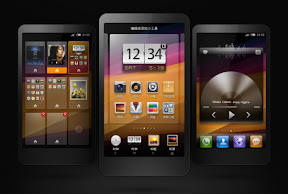
With the phone unlocked, I now had the opportunity to “flash a custom ROM” onto the phone. CyanogenMod was the obvious choice, but I had been reading more and more about a Chinese company, Xiaomi, and their custom Android ROM, Miui. CyanogenMod looks very similar to stock Android and the team puts most of their effort into features and power, but Miui has taken a different approach and reskinned the entire UI. There’s very little in common with Android or even Sense. Sure, it’s the same 4×4 icon layout with a top notification bar and bottom button tray (same as every smartphone), but the “look” is entirely unique. All of the system-type apps, like the music player and text messaging, are new. Even better, Miui has fantastic support for themes, and better yet, you can cherry pick only the parts of themes that you like to create your own, totally custom theme. How cool is that?
The Flash
If the unlocking process was easy, the installation of Miui was just as painless. It took a few minutes and a couple of restarts and that was it. In my hands I held what was essentially an entirely new phone! Awesome! Of course, the downside was that, in my hands, I held an entirely new phone. I had to re-install all of my apps and reconnect with all of my social media services, but the process was pretty simple. In just 90 minutes or so, I was downright giddy! Over the next few days, I’m sure the wife became sick of watching me constantly play with my phone and, every few minutes, blurt out something like, “Oh cool! You gotta check this out!” She’s a good sport.
Some of the best improvements over stock Android are the capabilities of the Nexus One that Miui engages but that Android inexplicably ignores. It’s confusing especially since the “Nexus” phones are supposed to showcase all that Android can do. The FM radio is one example; it’s not accessible via Android at all. Multitouch is another. Why Google wouldn’t enable these features is beyond me, unless it has something to do with IP and lawsuits?
The Verdict
I’ll make it simple: Miui is awesome! I could go on for days on some of the best features, but here are a few of the key things that make it better than Android (and I won’t even compare it to iOS, which barely allows any user customizations at this level). It’s incredible to think of the amount of development that went into Miui, and that it’s FREE!
- Unlock Screen: Miui allows you to unlock directly into the dialer or messaging. The developers looked at the typically static unlock screen and asked themselves, “Why do people usually open their phones?” Obviously, it’s when they get an alert or they want to make a call. The unlock screen has three icons, a phone, lock, and message balloon. If you swipe on the phone icon, the phone unlocks into the dialer. It gets better by putting a number indicator to tell you how many unread texts or missed calls you have. Even better, if you press and hold on the message icon, it pops up the last few unread messages with no need to even unlock your phone! That’s amazingly helpful! If you’re listening to music, the unlock screen adds fwd/back and play/pause buttons so that you can quickly manage music without diving into your phone. This is invaluable when I’m running and listening to music on my phone.
- Camera: Miui speeds up the camera app’s opening so that you can take photos almost instantly. Then, they add dozens of new settings that Android ignores, like burst mode, effects, anti-shake, metering modes, and many more. You can even focus on specific areas of the image just by tapping that area. It also adds 720p video recording, for your high-def, memory-eating delight.
- Toggles: Stock Android offers a neat widget to toggle wifi, gps, sync, and brightness. Miui, again, goes much farther by putting 12 toggles into the swipe-down notification menu, making it accessible from any screen (unlike a widget, which lives on an individual screen). The “reboot” is an interesting toggle, and they even give you options for the type of reboot you wish to perform. Geeky, and I’ve never had to reboot my phone, but neat nonetheless.
- Guest Mode: An awesome feature that hides calls and texts and prevents apps from being deleted. Sure, it’s useful if you’re going to let someone else use your phone, but it’s killer for parents who want to let their kids play with their phones.
- Themes: I mentioned them earlier, but Miui themes are incredibly comprehensive and powerful, changing everything from fonts and sounds to icons and icon shapes, the look of the messaging interface, and the number of apps in the app tray. It’s incredible how they’ve implemented this to the point of essentially allowing anyone to create a theme and almost call it their own ROM. It’s that powerful.
- Torch: The Torch has to be the coolest app on Miui. I’m not sure if something similar is available elsewhere or in a downloadable app, but it’s brilliant! What does it do? From the lock screen, if you hold down the home key, your camera flash illuminates as a flashlight! It’s awesome for walking up dark stairs, finding your keys (or the keyhole), or not tripping and killing yourself in the dark.
- Additional Fluff: Pinching on any screen pops up a thumbnail of all screens, allowing you to quickly navigate to the desired screen or add new screens. App folders can create collections of apps within one button (yes, iOS has had this feature for a while…). There are eight screen transition options (when you’re swiping between screens), from 3D cube to rotate to page. You can add apps on up to 11 (maybe more?) screens, while Android limits it to 5. FTP, which allows you to copy files to/from your phone over wifi. The dialer shows a keypad plus the past four calls to quickly dial a recent caller. The battery icon can be made to show the exact percentage remaining, not just a simple, partially-empty icon. You can control, app by app, which can transfer data over wireless, wifi, or both, letting you specify, for example, that email can sync on wifi and wireless, but Netflix can only use wifi to save yourself from using all of your monthly data.
Bottom Line
I’m sure I’m forgetting a few things, but I think you get the drift. If you have an Android phone and want more control and a fresh UI, definitely give Miui a look. You’ll unlock your phone’s full potential and give yourself the chance to truly customize every aspect of your phone and make it your own. Honestly, it’s saved me a few hundred bucks from upgrading to an entirely new device. Sure, I’d love to have a bigger screen, and the N1′s “champagne” color is really cramping my style, but even in today’s lightning fast mobile phone world, my 18-month-old device is holding its own!
Get on it! I waited way too long, and now I’m looking forward to the day that I get tired of Miui (a few months, probably) and can give CyanogenMod a try. I’m sure the wife is excited for that as well…
Screw the VCs, I Know JQuery!
0When I first set out to start my own app business, I figured it would require a few basic things: a business plan, developers, an alpha version, and then lots of angel and/or VC money to make it all come together. But, this week has really made me realize that I was very wrong. Let’s take a look the “why” for each area.
- Biz plan: In my years in the Bay Area, I’ve come to be highly suspect of any business plan, especially the revenue projections. Moving to Hawaii and working with some non-Bay Area companies has only reinforced my belief that business plans are akin to resumes for businesses: slightly inflated at best, outright lies and fabrications at worst. Business plan financials are notoriously inflated, because unless they show a billion-dollar market opportunity, they are worthless to VCs. So, every business plan creator then fabricates that billion-dollar opportunity out of thin air (and Gartner reports). It’s one of the many dirty little secrets of startups: everyone knows that it’s a lie, but everyone just goes along with it. (In place of a biz plan, I created a simple, three-page “concept document” to pass around for feedback.)
- Developers: I wish that I could code. I wish that I could create some whiz-bang app that used your GPS coordinates to tell you the optimal inflation for your mountain bike tires, or could use a photo from my phone to tell me if that slice of bread is bad before I make toast with it. I wish that I could take all of my ideas for the next killer app and make it a reality that same evening. Sadly, I’m limited to Google’s App Inventor (yes, I’ve already created my very own “whack-a-mole” app), WordPress (you’re looking at it right now – and you’ll see a different version if you visit this page with your mobile phone), and have just been introduced to Jquery Mobile. What does that mean? Well, the combination of these three (plus others, like Mobile Roadie and this list), make it easy for anyone with some basic knowledge of code to create at least a nice alpha version of any mobile app and at best a fully functional product.
- Alpha Version: Ah, the all-important alpha version: creationism. Sure, it might not actually process credit card payments or use the stars for navigation, but it will give you the ability to give a great demo and introduce your app concept to friends, partners, and potential users/customers. Using Jquery, it took me about one day to create my first mobile web app – mostly functional! I made a “Call Now” button fire off the phone’s dialer. I used coordinates to create a “Map It” button that opens Google Maps’ navigation tool. And, it all looks pretty darn nice, if I must say. That’s amazing, and significantly delayed my need to pay real money to real developers. Sure, I’ll need great developers very soon, but it’s amazing what can be accomplished easily and free these days.
- VC mondy: How much have I spent so far? Well, not counting my own time and Starbucks purchases, I’ve pretty much spent zero dollars and have a “real” version of my concept app that I can show to everyone. It doesn’t cover the full breadth of my concept, but it gets the point across and does it much better than me saying, over and over, “Imagine if you had this on your mobile phone…” Now, I can show them what I mean, and get exponentially more valuable feedback, ideas, and direction.
So, why do I even need VC money? Last fall, I watched this video by Jason Fried. One of his points that resonated with me was around taking outside investment: once you take that money, you’re focused on spending it, not on actually making money. It was a great point, and I’ve seen that happen countless times in Bay Area startups. Get $X million, spend it like you’re already making millions in revenue, then scramble for your next round of funding when you realize that you aren’t pulling in the revenue for which you set expectations in your business plan (see #1 above). I also recently met with a friend who has had success in numerous startups, large and small. When I mentioned looking for some angel funding, he was almost offended. Why would I want that false sense of security, he asked. Why would I plow money into development, or marketing, that wouldn’t be sustainable after the money ran out? Why would I take seed money at a fictitious valuation, which then requires a valuation increase for Series A, which then requires an inflated valuation for Series B, and so on? Why would I want to dilute my potential? (Of course, I can see many reasons to actually take outside investment, like the expertise provided by the advisors, to enter new markets, or to expand a proven model.)
Bottom Line
In the few short weeks that I’ve been at this, I’ve talked with a bunch of developers (CA, HI, Mexico, and India), a few VCs, and a ton of friends and colleagues. While 100% of the feedback has been valuable, only about half of it has been positive. In most cases, I tend to agree when they point out flaws, challenges, and competing products. It helps me to hone my pitch and focus my concept. It makes me better at what I’m doing, gives me a thousand more ideas, and helps me to really figure out how to make this work.
Yeah, I’ll probably need VC money to make this work. But, I’ll never get tired of reading the stories about successful entrepreneurs recounting the dozens and dozens of people who told them, “That’ll never work.” On the VC side, I just hope I don’t have to plow through 298 more rejections before I reach the level of Pandora…
Channeling the Positive…
0So often, I tend to get very negative when it comes to marketing or business ideas. I’m sure my DW can attest to my most-used comment (“outburst” is probably a better word…) while reading VentureBeat is, “Oh my god! Listen to this stupid idea that just got millions in VC funding!” I’m not sure if it’s age, cynicism, or just being around a critical mass of coworkers over my lifetime to really, finally be able to quickly separate the smart from the, well, not so smart.
Example: While reading about Bump.com, the license-plate social media startup that links people via their car’s license plate numbers and has just raised $1M, I jumped to the conclusion that it was, yet again, another reason that the Silicon Valley bubble was about to burst. Instead, I should have focused on the positives:
- VC and angel money is fairly easy to get.
- A startup’s focus is usually very different after a year.
- Getting an early jump on connecting your car to your social graph is an ingenious idea.
- This is a great experiment to test the bounds of social media.
- I now have an outlet beyond my middle finger and my horn for the jerk-store in front of me who jammed on his breaks and didn’t use his turn signal.
With less than two weeks focused on my own startup, I’ve quickly realized that there is as much negative energy in the business world as there is positive. And, being pretty much a solo operation, it’s up to me alone (and maybe Buddha) to ease my suffering. My negative energy hasn’t been because these other startup ideas have been that bad (OK, some have been that bad…), it’s been due to my jealousy and anger at myself for not having the confidence and positivity to launch something on my own.
Bottom Line
Now, when my startup launches, I can’t wait for all of the other people to say, “Yeesh, what a stupid idea!” It’s already happening, and, after a momentary, “oh no, they might be right,” I quickly plow forward, knowing that this is a great idea! And, to all of those other companies getting seed or VC funding, I say, “Good for you! (But leave some for me!)”
On My Own: Starting Something Big
1Well, today is my first day as a full-time employee of my own company! Sure, I have no salary, no funding, no infrastructure, no office, and am incredibly anxious, but at least I’m doing it!
It’s been something I’ve wanted to do for years, and finally, I’m going all in. This past Friday was my last day at my previous (and hopefully final) consulting gig, and now the only boss is ME – and my wife…
With companies like Groupon, LivingSocial, Gilt Groupe, Zynga and others raising hundreds of millions of dollars at valuations in the billions of dollars, I became increasingly inspired. With copycat companies and silly ideas like a license-plate social network raising millions, I became increasingly frustrated: If these marginal ideas can get off the ground, just think of how a GREAT idea would do!
So, after MUCH encouragement and prodding from my lovely, supportive wife, a lot of “that’s a great idea” from friends, and sideline co-founder support from buddy, I’m going all-in and starting my own business! Today, Monday, March 7, 2011, is day one!
I’d love to tell you all about right here, but I’ve always been jealous of the secrecy surrounding those so-called “stealth” start-ups. (I mean, really, why can’t I know? Why am I not allowed in your group? Is this junior high?) So, for a little while, it’ll be stealth – at least until we find a name for it…
What I can tell you is that it’s going to be an app-based business – and let me coin that phrase right here, right now. It’s like an online or e-commerce business, but the “online” component will be replaced by mobile apps. So, while you may think of it as just a mobile app, it’s not. It’s a business that’s facilitated by mobile apps. Sure, there will be a web component, but only for support and data entry and complex activities. The key to the idea is marketing, and that’s what I love. There’s a marketing challenge, and hopefully, this is the solution.
I can also tell you that the idea sprouted about a year ago, but has really taken hold since we’ve moved to Hawaii, where the $12 billion tourism industry is about 25% of the total economy. This is a great year to start a tourism-related business in Hawaii, since visitor spending is already up 20% this year after the worst drop in economic activity since Hawaii became a state. I’d love to tell you more, but my boss is a real jerk and I must get back to work…
Stay tuned, and hopefully this is the start of something BIG!
Why Consumers Should Embrace Location-based Services
0Privacy. It seems as if it’s the media’s only focus every time a location-based or social app or service is mentioned. With RFID tags, GPS apps, Foursquare, Facebook’s Places, and now iTunes’ Ping, everyone thinks that sharing a bit of info about your likes, dislikes or whereabouts is going to lead to the downfall of civilization. While everyone must be careful with their personal info, how much detail they share (such as city vs. eight-decimal GPS precision), and how often they share it, there are so many more benefits than drawbacks to these services. Plus, the risk that the company owning or using the data will do anything that’s harmful and directed at an individual really isn’t even an option.
In 2000, while at business school (and long before Facebook and Twitter and Foursquare), I took a ‘marketing data analytics’ course that focused on clickstream analysis. Even then, privacy was beginning to become an issue and our instructor summed it up in such a way that I’ve always referred back to his quote:
In the good old days, you went in to your neighborhood market, the owner knew you and what you purchased. If a product that you liked was back in stock, and the owner mentioned it, you’d be grateful. If the owner said that, since you liked plums and apricots, you’d also probably like pluots, you’d respond with a big ‘thank you.’
But, if a computer or corporation does the same things, people think it’s creepy.
I may be naïve, but consumers shouldn’t worry about ‘big brother’ drilling down to find out that John Doe purchases too much beer or eats too many donuts. Being a B2B marketer with 50,000+ contacts in my company’s marketing database, I can assure you that the last thing I do is focus on marketing to individuals – it’s all about the numbers and aiming at segments.
For B2C, my 50,000 contact names are nothing. Facebook has 500 million names – and growing. Marketing a marketing analytics solution for the past two-plus years, we’ve analyzed the behavior, purchasing, and response patterns of millions or individuals – and we’ve never seen a single name. At best, we have a many-digit number, spread across multiple fields, that has no personally-identifiable information (PII). Even our customers themselves have a daunting task of tying a name to an activity. Having worked in tech for over a decade, the privacy fear-mongers obviously have no clue as to the cleanliness, integration, and access challenges companies have with their own data. In the vast majority of corporate analyses, the data is aggregated or sampled such that connecting information back to a single person is impossible.
Again, consumers must be diligent to protect their privacy through each app’s settings (something that should be much easier than it is today). But, I can think of dozens of reasons why consumers should embrace these services – from a discount as you walk by a store to interactive dressing rooms at retailers that use RFID tags to suggest complimentary products (and help reduce theft).
Bottom Line: I look forward to the day that I opt-in to offers from the local coffee shop and am hit with a “free apple fritter with purchase of your double non-fat latte” offer on a Saturday morning. That’s a privacy risk I’m willing to take!


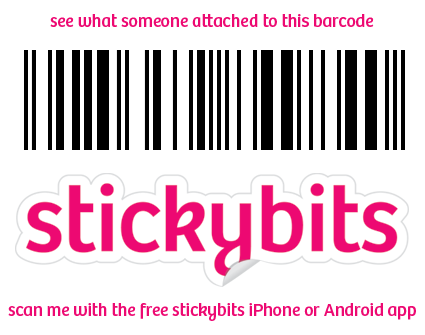
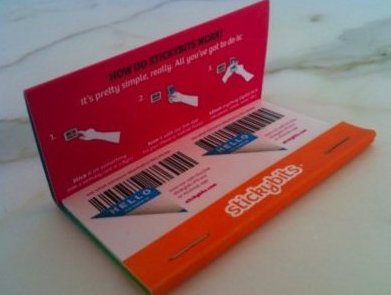
As a marketer, I immediately started thinking of ways to utilize this to expand my company’s presence, awareness, and ability to put content into the hands of our prospects. I also thought that – as Stickybits